How to build your own D365 F&O MCP server
An open source MCP server that lets Claude read and write D365 F&O data through OData on any environment. No Copilot Studio or Copilot credits, hosted with every user under their own F&O roles or local with one service account.

A few weeks ago I wrote about getting my own F&O dev environment. With a box of my own I finally had a place to try things without touching a project. The first thing I wanted to try was Claude, to see how good it is with real F&O data. Can it answer a question like which free text invoices are still not posted? Can it create a customer group when I ask it to?
The protocol for that exists and it is called MCP. Microsoft even ships a Dynamics 365 ERP MCP server. The catch is that it needs an approved client on an allowlist and bills Copilot credits per tool call outside Copilot Studio. On a personal VHD box or a cloud-hosted dev environment it is simply not available.
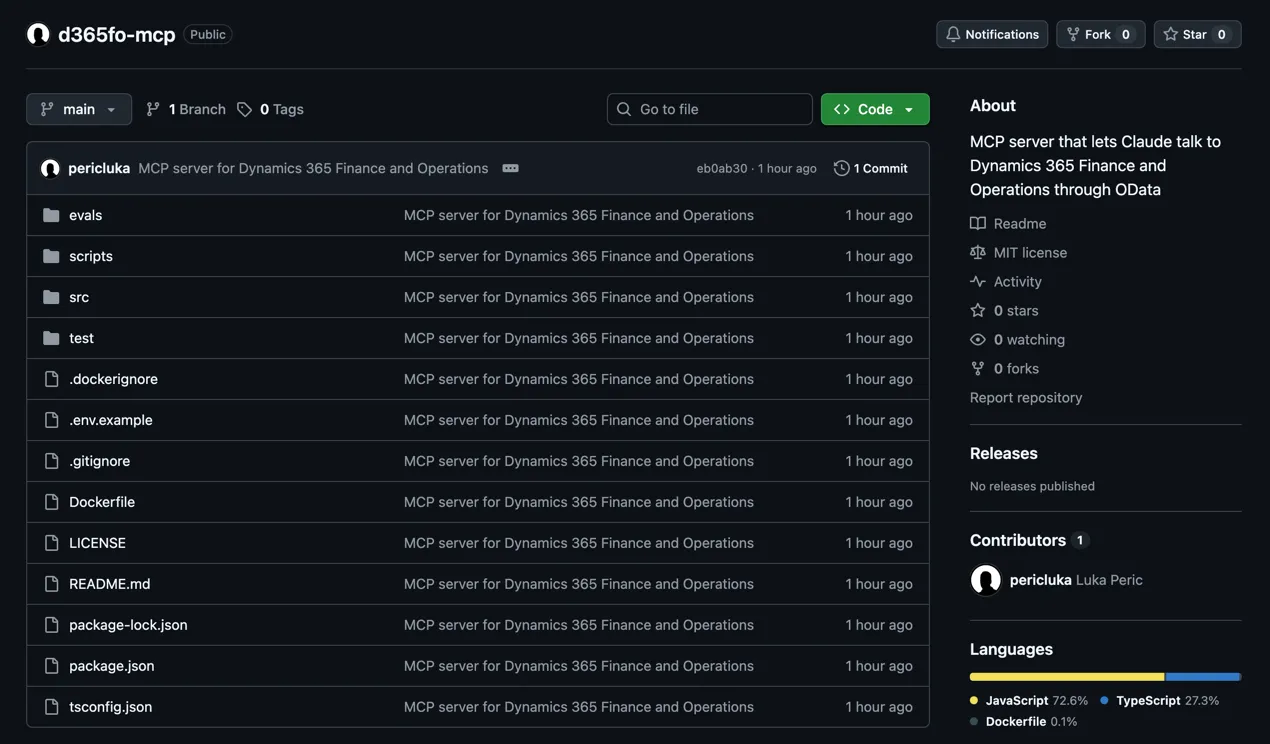
So I built my own. The server is about 4,500 lines of TypeScript, talks to F&O through plain OData and works on any environment that has an OData endpoint. It runs on your own machine with client credentials or as a hosted server where every user signs in and F&O applies their own roles. The code is on GitHub at pericluka/d365fo-mcp, together with more than 300 tests written in plain JavaScript. This post explains how it works, how to set it up, what I learned about F&O OData while making Claude use it and how the hosted version keeps every user inside their own security roles.
MCP in three sentences
The Model Context Protocol is an open standard that lets an AI assistant call tools that live outside of it. A server exposes tools with a name, a description and a JSON schema for the arguments, which is all the assistant needs to decide which tool to call, send the arguments and get the result back as text. For F&O it means Claude can call a tool named query_entity with an entity name and a filter and the server turns that into an OData request.
Microsoft has a server, so why write one
Microsoft’s Dynamics 365 ERP MCP server is a serious product and on a customer Tier 2+ environment, production included, it is the right default. It runs as the signed-in user, so F&O security roles apply. Besides data tools it has form tools that open forms, set fields and run form actions through server APIs rather than a client session. It also has action tools that call X++ classes. Nothing in this post replaces that.
Even there it is not always the best tool for the job. Here is why I still wanted one of my own.
- It works on every environment you have. Microsoft’s server requires Tier 2+ or a Unified Developer Environment and version 10.0.47 or newer (10.0.45 PQU-7 and 10.0.46 PQU-2 also qualify). That rules out the VHD one-box, every cloud-hosted dev box and many of the older environments at customers. Mine needs an OData endpoint, which every F&O environment has.
- No credits, no client approval. Outside Copilot Studio every call to Microsoft’s server bills 0.1 Copilot credits unless the user holds a Finance Premium or Supply Chain Management Premium license. Before the first call an admin has to register your client in Entra and approve it on the Allowed MCP clients list, where only Copilot Studio, VS Code, Microsoft’s Copilot Cowork and two Finance agent registrations are allowed by default. Mine needs an app registration, one row in a setup form and the model you already pay for.
- Any client, including a local model. Because the server speaks plain MCP it works from Claude Code, Claude Desktop, Cursor, VS Code, your own agent and from a local model when the data cannot leave the building. Microsoft’s server can take other clients too, including one in front of a local model, but each one needs the registration and approval above, so for an experiment on a laptop it is a much longer road.
- Least privilege by design. The server is read-only until you say otherwise, caps the size of every query result and can be limited to a list of entities with one setting,
FO_ENTITIES, so Claude sees a narrower view than the F&O role of its user. A second list,FO_WRITE_ENTITIES, narrows what it may change. Microsoft’s server exposes everything the role allows, which is fine for an employee and too much for a demo, an external consultant or an experiment. - You can extend it in an afternoon. Add a tool that calls your custom service, starts a DMF export, lists the business events catalog or compares the same entity across two environments. With Microsoft’s server new logic means an X++ class in the AI tool framework and a deployment.
- It also fits automation. Client credentials run from a script, a pipeline or a scheduled job without a signed-in user. The same server that answers Claude in a chat can feed a nightly data quality check.
- Metadata in your language. Microsoft’s server shows form labels in the user’s locale but its entity metadata and guidance are US English only. Mine resolves entity and field labels through the Metadata service in the language set in
FO_LANGUAGE, for exampledeorfr, sodescribe_entityshows every field with the label a user knows from the client. - Nothing is hidden. Every query answer includes the exact OData request that produced it, so you can repeat it with curl and audit it. For anyone who builds integrations that alone is worth the setup.
- You own the roadmap. The first ERP MCP server, the static one, lived about a year and a half and was retired on 1 October 2026. The dynamic one is new and its list of known limitations is long. A few thousand lines you own change when you need them to.
How it works
The server is a Node process that Claude starts and talks to over standard input and output. Behind every tool call there are three things.
- An access token from Entra obtained with client credentials, the same flow any unattended F&O integration uses. The token is cached until a minute before it expires, so in practice this is one request an hour.
- Entity metadata from the F&O Metadata service, the lesser-known sibling of the data endpoint.
/Metadata/DataEntitieslists every entity,/Metadata/PublicEntitiesfiltered onEntitySetNamereturns the fields and keys of one entity and/Metadata/Labelsresolves label ids to text. The entity list and the entity details are cached for ten minutes, so most tool calls go straight to the data endpoint. - A call to
/data/<collection>with the OData query options Claude asked for, with the rows returned as JSON.
The six tools:
| Tool | What it does |
|---|---|
environment_info | Checks the connection and returns the version, the legal entities and the default company |
search_entities | Finds data entities by name and returns the OData collection name |
describe_entity | Lists the fields of an entity with type, key, mandatory, label and the enum type and values for enum fields |
query_entity | Reads records with $filter, $select, $orderby, $expand, $top, $skip and $count, scoped to the default company, to a company you name or across all companies |
create_record | Creates a record, only when writes are enabled |
update_record | Updates fields on a record, only when writes are enabled |
query_entity returns 20 rows unless Claude asks for more, never more than 500 per call and never more than about 40 KB. Every answer says whether more rows exist and where the next page starts. When a result is cut the server says so and tells Claude how many rows it kept, so for anything bigger Claude pages with skip, selects fewer fields or asks for a count instead of rows.
The tool descriptions are the most important part of the code. Claude never reads the documentation of F&O OData, it only reads what the server tells it. So the description of query_entity says that string fields support only eq and ne with * as a wildcard, that enums must be written as Microsoft.Dynamics.DataEntities.SalesStatus'Backorder' and that date fields come back at noon UTC. The server also sends a short set of instructions when the client connects, which is where the search, describe, query order comes from. With that text Claude gets the filter right on the first try far more often. An argument a tool does not know is refused with the list of valid ones, so a misspelled orderBy cannot quietly return unsorted rows.
Setup
You need Node 22.19 or newer, the right to register an application in the Entra tenant your F&O environment signs in with and an F&O environment where you can add that application. On a personal box that tenant is your own. On a customer environment it is the customer tenant, so if app registrations are locked down there you will need to ask the Entra admin for one. I built and tested everything on Node 24.
Step 1. Register an application in Entra
In the Entra admin center create a new app registration. Single tenant, no redirect URI, no API permissions. F&O does not check Entra permissions for client credentials, it checks its own table of allowed applications in the next step. Copy the Application (client) ID and the Directory (tenant) ID, then create a client secret under Certificates & secrets and copy its value right away, it is shown only once.
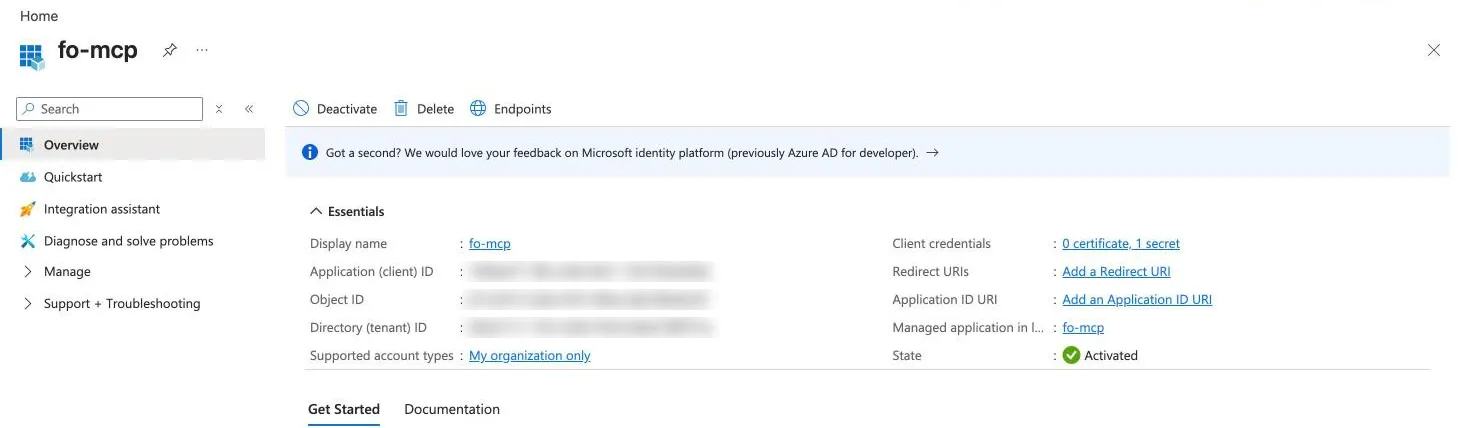
Step 2. Register the application in F&O
In F&O open System administration > Setup > Microsoft Entra ID applications and add a row with the client ID, a name and an enabled user. Everything the server does runs as that user. On my throwaway one-box that is Admin. On any environment with real data create a dedicated user first under System administration > Users > Users. It does not need to be a real person, but it has to be an account that exists in your Entra tenant. Since March 2024 F&O accepts only users that Entra knows. The token comes from the app registration, so nobody needs to sign in as that user. Give it a role that covers only the entities you want Claude to read, for the examples below that means customers and free text invoices, plus payment terms and the right to create customer groups for the last one. Then pick it in the User ID column. It needs an F&O license because its role works with business data, more on that under Things to be careful about.
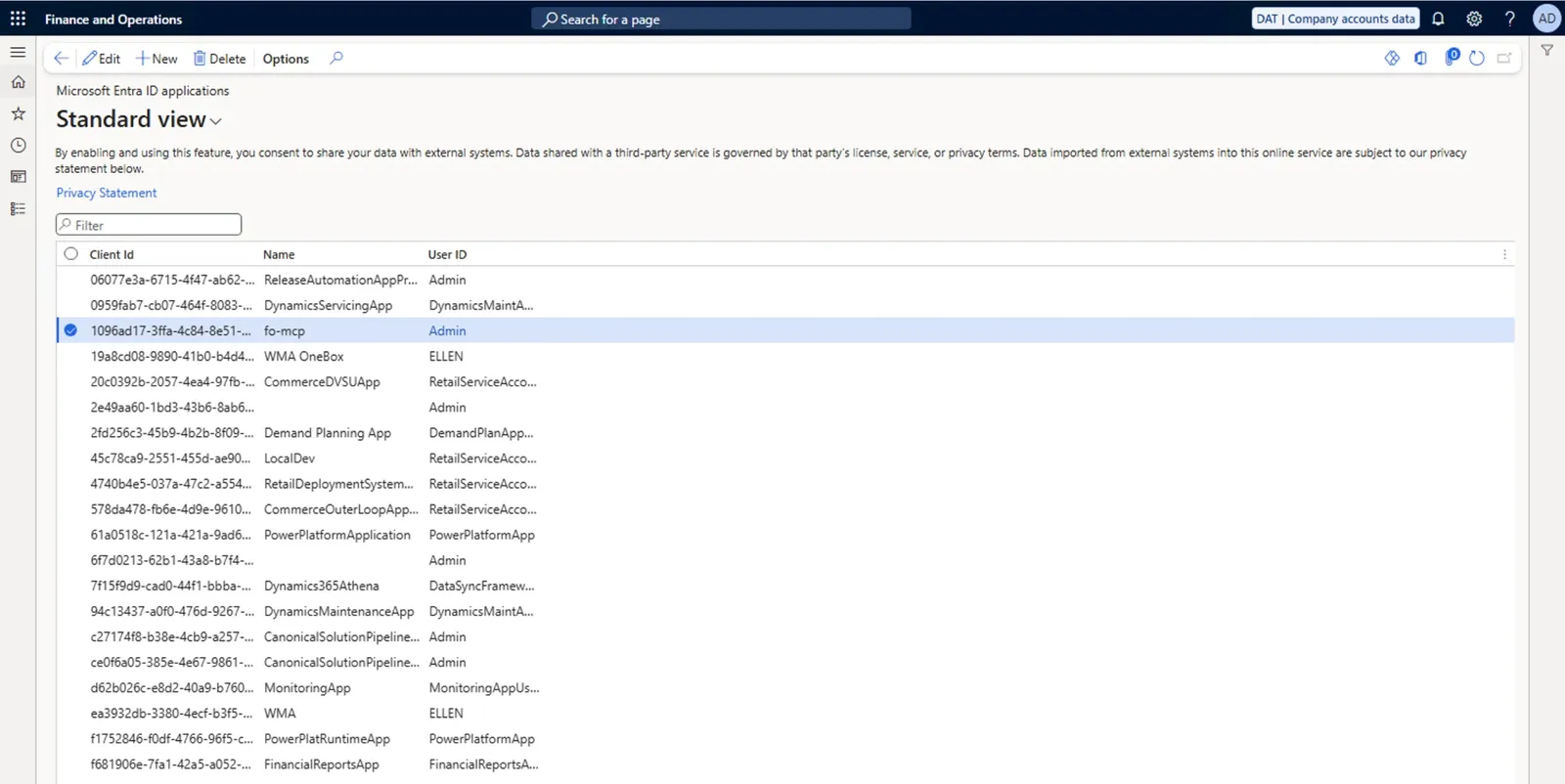
Step 3. Clone, build and configure
git clone https://github.com/pericluka/d365fo-mcp.git
cd d365fo-mcp
npm ci
npm run build
cp .env.example .env
npm ci installs the exact versions from the lockfile and npm run build compiles the TypeScript into dist/index.js, the file Claude will start later.
Fill in .env. FO_URL is the address you open in the browser, just the host and nothing after it, so https://xxx.sandbox.operations.dynamics.com for a Tier 2 sandbox, https://xxx.cloudax.dynamics.com for a cloud-hosted dev box or https://usnconeboxax1aos.cloud.onebox.dynamics.com for the VHD. The ?cmp=USMF part that the browser adds does not belong there. Add the tenant ID, the client ID and the secret from Step 1 and the default company in FO_COMPANY, which is the legal entity the server reads when a question does not name one. Leave FO_ALLOW_WRITES at 0 for now. On a cloud-hosted or Tier 2+ environment that is all. On the LCS VHD one-box there are three more things to do, covered next.
If your environment is the LCS VHD on Azure
The one-box from my previous post needs three extra things, one in the Azure portal and two in .env.
- Open port 443 for your own IP address in the network security group of the VM, next to the RDP rule. The certificate export below and every call the server makes go through that port.
- The host name
usnconeboxax1aos.cloud.onebox.dynamics.comonly resolves inside the VM. SetFO_HOST_IPto the public IP of the VM and the server resolves the name itself. No hosts file, no sudo. - The box uses a self-signed certificate. Export it once and point
FO_CA_FILEat it, so certificate validation stays on. On macOS or Linux run this in the d365fo-mcp folder:
openssl s_client -connect <vm public ip>:443 -servername usnconeboxax1aos.cloud.onebox.dynamics.com -showcerts </dev/null | openssl x509 > onebox.pemThe certificate is self-signed, so a copy fetched this way is only as good as that one connection. Before you trust it run openssl x509 -in onebox.pem -noout -fingerprint -sha256 and compare the result with the SHA-256 fingerprint the browser inside the VM shows for the F&O site. Then set FO_CA_FILE=onebox.pem in .env. A relative path is resolved from the project folder, not from the shell you ran the command in. On Windows open the F&O site in a browser inside the VM, view the certificate and export it as Base64 encoded X.509 (.CER), which is the same PEM format. If you have Git for Windows, the openssl command also works in Git Bash.
Step 4. Check that it works
Run the first call without any AI in the loop:
node scripts/call.mjs environment_infoThe first call after an environment start may come back with an error that starts with No answer from while F&O builds its metadata, because the server gives up after 50 seconds instead of hanging. Run it again and the second call answers in about a second.
{"url":"https://usnconeboxax1aos.cloud.onebox.dynamics.com","applicationVersion":"10.0.48","platformVersion":"7.0.7996.43","defaultCompany":"USMF","writesEnabled":false,"dataEntities":5805,"odataEnabledEntities":4500,"legalEntities":[{"id":"BRMF","name":"Contoso Entertainment System Brazil"},...]}If the call fails, the message tells you where to look. These are the five messages a fresh setup runs into.
- Token request failed with an AADSTS code. Entra did not issue a token. The tenant ID or the client ID is wrong, the secret is wrong or the secret has expired. Check the three values in
.envagainst the app registration from Step 1. - F&O rejected the access token. Entra issued the token but F&O answered 401. The client ID is missing from the Microsoft Entra ID applications form from Step 2, it is registered on a different environment than
FO_URLor the mapped user is disabled. - ENOTFOUND or a certificate error. On the one-box the section above covers both. Anywhere else ENOTFOUND means a typo in
FO_URLand a certificate error usually means a company proxy that inspects TLS. The README covers that underNODE_EXTRA_CA_CERTS. - A
problemsentry sayingFO_COMPANYis not a legal entity. The company code in.envdoes not exist in this environment. The same output lists the legal entities, pick one of those. problemsentries with a 403 forLegalEntities,GetApplicationVersionorGetPlatformVersion. The mapped user has a narrow role that does not cover the legal entity list or the two version actions. The connection works, so move on to the next step.
Step 5. Connect it to Claude
For Claude Code one command is enough. The server reads .env from its own folder, so nothing else is needed.
claude mcp add fo-mcp --scope user -- "$(which node)" /absolute/path/to/d365fo-mcp/dist/index.jsRun claude mcp list afterwards and fo-mcp should show as connected. On Windows there is no $(which node), so put the full path to node.exe in its place, in double quotes when it has a space, for example "C:\Program Files\nodejs\node.exe".
For Claude Desktop add the same thing to claude_desktop_config.json. On macOS the file is at ~/Library/Application Support/Claude/claude_desktop_config.json and on Windows at %APPDATA%\Claude\claude_desktop_config.json. Settings > Developer > Edit Config opens it from inside the app. Use the full path to node, because Claude Desktop does not read your shell PATH and a Node installed with nvm or Homebrew is otherwise not found.
{
  "mcpServers": {
    "fo-mcp": {
      "command": "/absolute/path/to/node",
      "args": ["/absolute/path/to/d365fo-mcp/dist/index.js"]
    }
  }
}
Restart Claude Desktop afterwards because it reads the file only on start. fo-mcp should then show up under Connectors in the + menu of the chat box. On Windows write both paths in the JSON file with doubled backslashes, for example C:\\Program Files\\nodejs\\node.exe.
Open a new session and ask something about your data, for example How many customers does USMF have? Claude will typically call search_entities to find the collection, describe_entity for the field names and query_entity for the rows. It skips the middle one when the question is simple enough.
To update later run git pull, npm ci and npm run build in the folder. Claude Code picks up the new build in a new session and Claude Desktop after a restart.
Claude at work
With the server connected I opened a new session and asked three things, from trivial to something an AR clerk would actually ask.
How many customers does USMF have? Two tool calls. Claude found CustomersV3 with search_entities, then ran one query_entity with count on and top set to 1, so the answer came from the OData $count instead of paging through records. 32 customers.
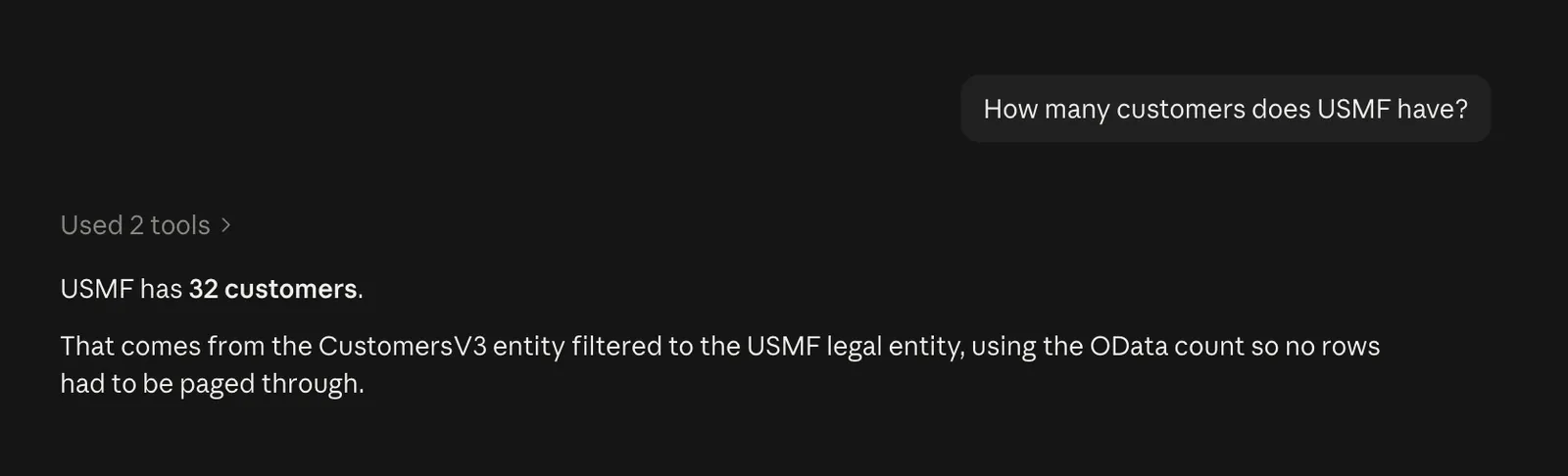
The screenshot hides the tool calls, so here is the same query_entity call made from the command line. The request line is the OData request the server sent and totalCount is the OData $count. hasMore and nextSkip tell Claude that more rows exist and where the next page starts. Note the cross-company=true and the dataAreaId filter, the server added both on its own and the section on F&O OData below explains why.
node scripts/call.mjs query_entity '{"entity":"CustomersV3","select":"CustomerAccount","top":1,"count":true}'{
"collection": "CustomersV3",
"company": "USMF",
"request": "/data/CustomersV3?$filter=dataAreaId eq 'USMF'&$select=CustomerAccount&$top=1&$count=true&cross-company=true",
"totalCount": 32,
"returned": 1,
"hasMore": true,
"nextSkip": 1,
"rows": [{ "CustomerAccount": "DE-001" }]
}Which free text invoices in USMF are still not posted, with the customer, the due date and the total amount from the lines? Six tool calls. Claude searched for the entity, read in describe_entity that IsPosted is an enum, filtered the headers with IsPosted eq Microsoft.Dynamics.DataEntities.NoYes'No', then pulled the lines of the four invoices by ParentRecId and summed the amounts. Four invoices, all from January 2018 and all long overdue, one of them in EUR. The table it produced is something I would paste into an email to the AR team as it is.
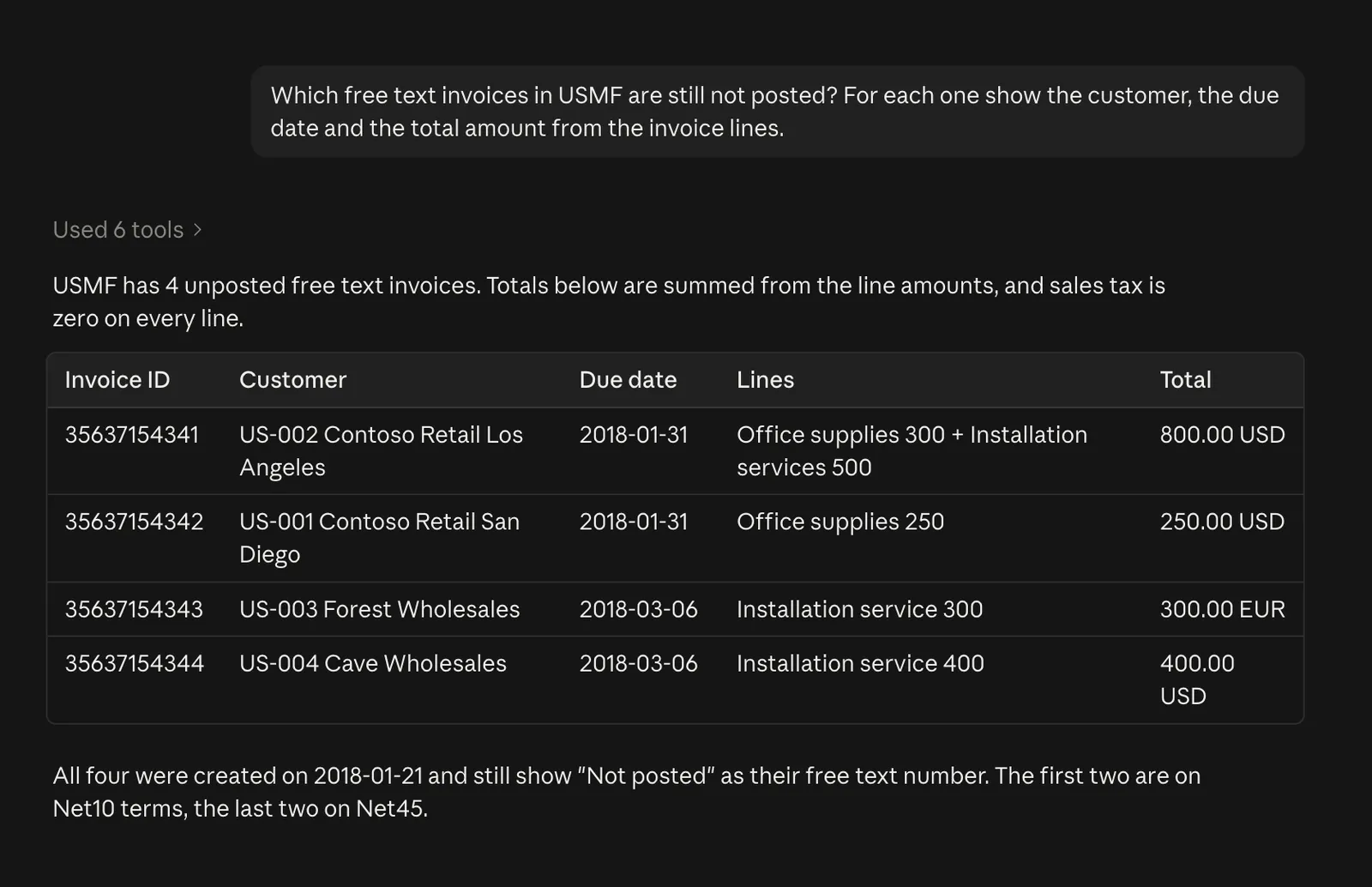
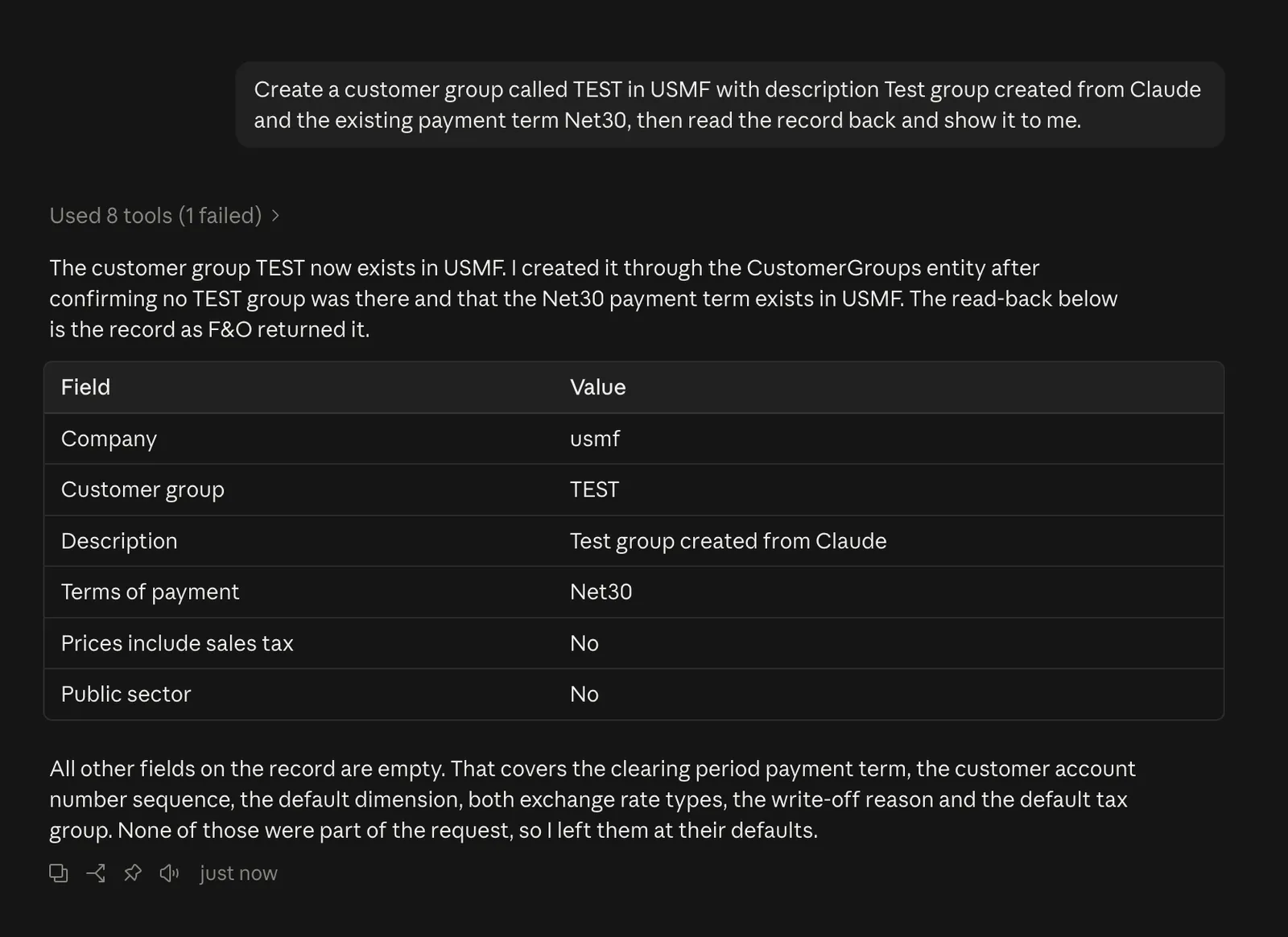
Create a customer group called TEST in USMF with the existing payment term Net30, then read the record back. For this one I set FO_ALLOW_WRITES=1 in .env and opened a new session. The server reads .env only when it starts, so Claude Code needs a new session and Claude Desktop a restart before create_record and update_record appear. Claude checked with describe_entity which fields exist and which are mandatory, confirmed that no group with that id existed, created it with create_record and read it back. One of the eight calls failed. Claude wanted to confirm that Net30 is a valid payment term and guessed an entity name, CustomerPaymentTerms, which does not exist. The server answered that the entity does not exist and asked Did you mean PaymentTerms, VRMPaymentTerms, CustomerPaymentFees? and the very next call went to PaymentTerms and found Net30. A guessed entity name is the most common mistake the model makes, so the error message suggests the closest real names instead of just failing.
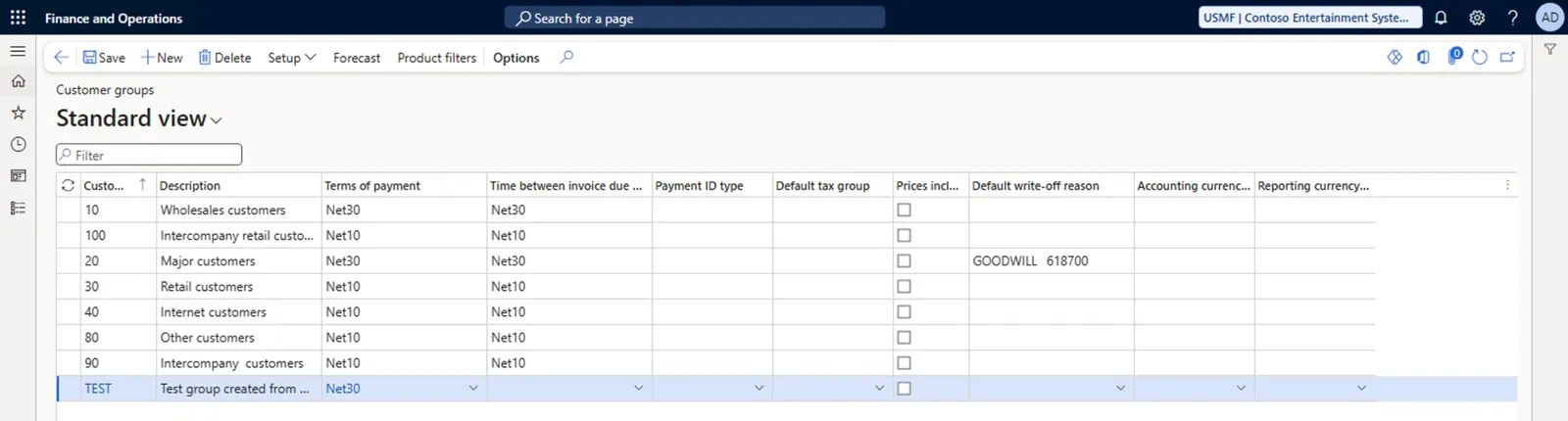
And the same group in F&O a moment later, in the Customer groups form of USMF.
What F&O OData taught me
Most of the time went into F&O quirks rather than MCP. If you build integrations you have probably met some of them.
Cross-company is not optional. Without cross-company=true OData returns only the default company of the user behind the token. For a service account that is usually DAT, which is empty, so every query looks like the environment has no data. The way to read one specific legal entity is cross-company=true combined with a dataAreaId eq 'USMF' filter. The server does that for every company specific entity. Global entities like Currencies or LegalEntities have no dataAreaId and reject the filter with a 400, so the server checks the metadata first.
String functions do not work. contains, startswith and endswith are rejected with the message The type System.String for the query operator is not Queryable. Only eq and ne work on strings and there is no in operator. Claude tries contains the moment it wants a fuzzy search, so the tool description says up front that it fails. What does work is a * inside an eq string, which F&O reads as a wildcard, so OrganizationName eq '*Retail*' finds every customer with Retail in the name.
Field names are case sensitive. DataAreaId eq 'USMF' answers 400 with Could not find a property named DataAreaId because F&O spells the field dataAreaId. A customeraccount in $select fails the same way. The server corrects any spelling of dataAreaId in filters and fixes the letter case of field names in select, orderby and the fields of a create or update, so customeraccount becomes CustomerAccount. A name the entity does not have is refused before it reaches F&O and the error lists the closest real names. Other field names inside a filter go to F&O exactly as Claude wrote them.
Enums need their type. SalesOrderStatus eq 'Backorder' fails with a type mismatch. The literal must be Microsoft.Dynamics.DataEntities.SalesStatus'Backorder'. The Metadata service reports the X++ enum name, so describe_entity qualifies it and returns it as enumType for every enum field, together with the names of its values.
Dates come back at noon. A Date field is serialized as 2016-01-15T12:00:00Z and an empty date as 1900-01-01T12:00:00Z. Only the date part means anything. UtcDateTime fields are real timestamps.
PATCH needs cross-company too. An update by key such as CustomerGroups(dataAreaId='USMF',CustomerGroupId='TEST') fails with No resources were found when selecting for update unless the request carries cross-company=true, even though the key names the company. It happens whenever the company in the key is not the default company of the user behind the token, so the server adds the option to every update of a company specific entity.
The version lives in odd places. There is no version endpoint. GetApplicationVersion is an action bound to DataManagementEntities and GetPlatformVersion is bound to DocumentRoutingClientApps. That is just where Microsoft put them.
Labels are one request each. /Metadata/Labels(Id='@SYS16445',Language='en-US') returns the text of one label and any attempt to filter the collection answers 501. A wide entity like CustomersV3 has 309 fields, so the server fetches labels twelve at a time and caches them.
The first call is slow. After the environment starts, the first metadata request takes a minute or more while the AOS loads the metadata and builds the OData model. The MCP SDK gives up on a tool call after 60 seconds unless the client raises that limit, so the server keeps a budget of 50 seconds per tool call (FO_TIMEOUT_MS) and then stops with a message that names the request it was still waiting for, instead of letting the client time out with no explanation.
Things to be careful about
- The server is read-only by default. Set
FO_ALLOW_WRITES=1only on an environment where you are fine with Claude creating and changing records as the mapped user. On the hosted server from the next section the same setting turns writes on for everyone who signs in, each with their own roles, unlessMCP_WRITE_ROLEkeeps the write tools for users with an Entra app role. Local or hosted,FO_WRITE_ENTITIESlimits which entities can be written at all. - The client secret sits in
.env. The file is already in.gitignore, so keep it that way, make it readable only by you and note the expiry date. Entra secrets expire and after you paste a new one the server only needs a restart. - Everything the tools return is data from F&O and the model reads it like any other text. A note on a record that tells the assistant to ignore its instructions cannot call a tool by itself, but it can steer the model. That matters with writes off too, because text in a record can ask Claude to send what it read somewhere else. So do not use the server in a session that also browses the web, reads mail or has other connectors that send data out. With writes enabled never let the client approve
create_recordorupdate_recordwithout asking you and read what Claude plans to change before it does.update_recordanswers with the old and the new values, so you can see what changed. - Every row a tool returns becomes part of the conversation at your model provider. On a customer environment that is customer data leaving F&O, so get the customer’s approval first and use
FO_ENTITIESto keep entities with personal data, such as workers and contacts, out of reach. - Licensing follows the people asking, not only the mapped user. Under the multiplexing rules in the Dynamics 365 licensing guide everyone who asks Claude a question that ends up in F&O needs an F&O user license, the same as with any other integration. Microsoft exempts agent identities from user licenses only for Copilot Studio agents and its own ERP MCP server, so a custom server over OData gets no such exemption. Microsoft’s license validation FAQ lists the technical roles a service account can hold without a license of its own.
- The code is free under the MIT license and comes as is, with no guarantees. Try it on a test environment first, keep an eye on what Claude wants to change and only then point it at real data. If something breaks, data gets lost or the Azure bill grows, I cannot take responsibility for it, so treat the server as a starting point for your own version.
One server for everyone, with their own roles
The local server has one obvious limit. Every call runs as the one user mapped to the client ID. That is fine on a personal box and wrong on a shared environment, where Claude should see exactly what the person asking is allowed to see and nothing more. So the repository has a second entry point, dist/http.js. I call it the remote server here and the hosted server once it runs on Azure. It serves the same six tools to Claude Code and to other MCP clients that sign in with OAuth and come back to a redirect URI on localhost. A client that comes back anywhere else has to be in redirectAllowed in src/oauth.ts, where the callbacks of claude.ai are already listed. Every user signs in with their own Entra account and F&O applies that user’s security roles.
How the sign-in works
MCP already covers this with OAuth. When Claude connects without a token the server answers 401 and points to a small JSON document that says where to sign in. Claude registers itself, opens the sign-in page in the browser and comes back with a token.
Entra cannot play that part on its own. MCP clients expect to register themselves on the fly and send a resource parameter of their own choosing. Entra supports neither, so the server is its own small authorization server with Entra behind it.
- Claude sends the browser to
/authorizeon the server. The first time a browser meets a client the server shows a short page that names the client and where the sign-in goes back to. It asks the user to allow it and remembers the answer for 30 days. Then the browser goes on to the Entra sign-in page with the server’s own app registration. - Entra sends the browser back to
/callbackwith a code. The server trades it for the user’s Entra token, keeps that token to itself and sends the browser back to Claude with a code of its own. - Claude trades that code for a token at
/token, checked with PKCE. The token is a random string that means nothing to Entra or F&O. - On every tool call the server looks up the Entra token behind that string. The first call exchanges it with the on-behalf-of flow for an F&O token of the same user, which the server keeps until a minute before it expires.
A sign-in in progress is not stored on the server. It travels encrypted in the state parameter that Entra sends back, tied by a cookie to the browser that started it. Entra tokens never reach Claude and the tokens Claude holds never reach F&O, which is what the MCP authorization spec asks for. The whole OAuth front is about 1,100 lines in src/oauth.ts and npm test runs more than 300 tests against a fake Entra and a fake F&O, the complete sign-in included, so you can read it and change it without a tenant.
Entra setup for the remote server
On a personal box the app registration from Step 1 can serve both servers, which is what I did. For a shared environment register a second app for the hosted server and do not add it to the Microsoft Entra ID applications form in F&O. The on-behalf-of flow does not need that row. Whoever holds the secret of a mapped app can act as the mapped user without anyone signing in. The app the remote server uses needs three more things.
- Expose an API with the Application ID URI
api://<client id>and a scope namedaccess_as_userthat admins and users can consent to. This is the scope users sign in with. - A Web redirect URI for the server’s callback,
http://localhost:3456/callbackwhile testing andhttps://<your host>/callbackonce hosted. Remove the localhost one before real users sign in. Claude’s own redirect URIs never reach Entra, the server handles them. - The delegated permissions
AX.FullAccessandOdata.FullAccessof Dynamics ERP, with admin consent.
A tenant that limits what users may consent to or puts Conditional Access on Dynamics 365 needs two more steps. The README lists them under Entra setup. I have run the remote server only against my own tenant and the one-box, with one app for both servers. The second app and those two steps are the parts I have not run myself, so try them on a test environment first.
Two things surprised me here. I expected the one-box to need an app registration of its own for the F&O side, because Entra cannot know a made up host name like usnconeboxax1aos.cloud.onebox.dynamics.com. It does not need one. Entra maps the one-box URL to the same Dynamics ERP app as a cloud environment, so the setup is identical. What my tenant did miss was Dynamics ERP itself. The admin consent button failed because the organization had no subscription or service principal for it and the consent page showed AADSTS650052. A tenant that has never used Dynamics ERP needs its service principal created once.
az ad sp create --id 00000015-0000-0000-c000-000000000000After that the consent went through on the first try.
On my box the row under Microsoft Entra ID applications stays as it is, because the local server still uses the same app. What the remote server adds is that every person who signs in needs their own user under System administration > Users > Users, with the email they sign in with and the security roles they should get. Without a user F&O answers 403 on every call. A personal Microsoft account needs one more setting, covered at the end of the next section.
To try it before hosting, start the remote server on the port of the test redirect URI. The MCP_PORT in .env.example is 3000, so pass 3456 on the command line. On Windows set MCP_PORT=3456 in .env instead and start it with node dist/http.js. Then sign in from a second terminal with the test script in the repository. It opens the browser, waits for the sign-in and calls environment_info as you, with your user name in the answer.
MCP_PORT=3456 node dist/http.js
node scripts/oauth-test.mjs http://localhost:3456/mcp
A tool name and its arguments after the URL run any other call as the signed-in user, for example query_entity '{"entity":"VendorsV2","top":1}', which is how you can repeat the comparison below.
Does F&O really apply the user’s roles
This was the question I cared about most. The app registration is still mapped to Admin in the Microsoft Entra ID applications form, because the local server needs that. If F&O used the same mapping for a delegated token, every user would quietly get admin rights.
That is not what happens. I signed in with three identities and ran the same five queries as each of them.
| Entity | Admin | Accounts receivable clerk | No F&O user |
|---|---|---|---|
CustomersV3 | rows | rows | 403 |
VendorsV2 | rows | 403 | 403 |
SystemUsers | rows | 403 | 403 |
SecurityUserRoleAssociations | rows | 403 | 403 |
MainAccounts | rows | 403 | 403 |
An identity without an F&O user record gets 403 with Please verify that the user is valid and set up correctly on every call. The clerk reads customers and gets User is not authorized to read view VendVendorV2Entity for vendors, with the same message for the other three. So the mapping in the form authorizes only the client credentials of the local server. A delegated token is authorized by the person behind it, with that person’s roles.
Then I signed in as the clerk and asked Claude the three questions from the Claude at work section. The customer count and the four unposted free text invoices came back exactly as they did for Admin, because customers and invoices are part of the clerk’s role. The customer group did not.
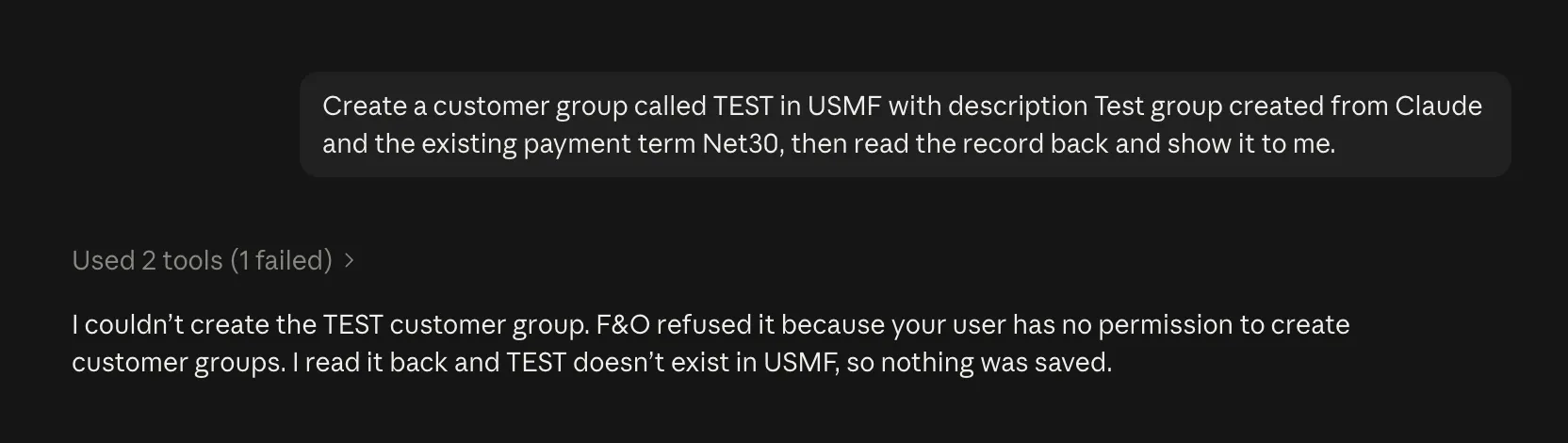
F&O refused the create with update access to property not granted. I had deleted the TEST group from the Admin run beforehand, so Claude found no TEST group when it read the table back. It said so in three short sentences, which is exactly the answer a clerk should get.
One more detail cost me two tries. My clerk is my personal Microsoft account, which is a member of the tenant. For such an account the user record in F&O needs live.com as the provider and the account’s email as the email. With the usual https://sts.windows.net/ F&O does not find the user.
Hosting it
The repository has a Dockerfile and the README has the commands for Azure Container Apps, which gives the server HTTPS, a public name and a place for secrets. The container needs the same FO_ values as your .env, the client secret included, because the on-behalf-of exchange uses it. Set FO_ALLOW_WRITES back to 0 there unless everyone who signs in should get the write tools. With a second app for the hosted server, FO_CLIENT_ID and FO_CLIENT_SECRET are the values of that app. The container also needs MCP_PUBLIC_URL set to the address Claude connects to, for example https://fo-mcp.<unique id>.<region>.azurecontainerapps.io/mcp. Copy the host from the Application Url of the container app, because the unique id comes from Azure and is not the environment name. Without MCP_PUBLIC_URL the server in the image refuses to start, because the default public URL is on localhost. The host of MCP_PUBLIC_URL with /callback is the second redirect URI from the Entra setup above.
One replica with 0.25 vCPU and 0.5 GiB kept on all month costs about 15 dollars after the free grant if it is busy all the time. Most of the month it only waits for the next question, which Azure bills at a much lower idle rate, so expect closer to 5 dollars. Keep it at one replica, because sessions and tokens live in memory and a second instance would not know them.
For a team put the server on a domain of your own instead of the shared azurecontainerapps.io name, keep the client secret in Key Vault and set MCP_WRITE_ROLE before you turn writes on. The README lists these and a few more.
My own deployment taught me three things.
- On an Azure free trial ACR Tasks are not allowed, so
az containerapp up --source .stops withTasksOperationsNotAllowedright after it creates the registry. For the test I ran the stocknode:24image instead and let it clone the repository and build the server on start, which takes a few seconds and needs no registry at all. That is fine for a throwaway test and nothing more. The README describes the cleaner way for your own deployment. Build the image on your machine withdocker build --platform linux/amd64, push it to any registry and pass--imageinstead of--source .. Without the platform flag an image built on an Apple Silicon Mac does not run, because Container Apps runs only linux/amd64 images. - The one-box certificate has to be inside the container. A Container Apps secret mounted as a file does that,
FO_CA_FILEpoints at it and certificate validation stays on. - The network security group of the VM has to let the container app in on port 443. A Container Apps environment without its own virtual network sends traffic from a shared pool of addresses, 161 of them in my region. That is acceptable for a throwaway box. For anything real create the Container Apps environment in your own virtual network with a NAT gateway, so there is exactly one address to allow. An existing environment cannot be moved into a virtual network later.
Once it runs, Claude Code needs one command and /mcp to sign in.
claude mcp add --transport http fo-mcp https://<your host>/mcpIn claude.ai and Claude Desktop the same URL goes under Settings > Connectors > Add custom connector. Connecting opens the server’s approval page and then the Microsoft sign-in in the browser.
The same comparison as above, run against the hosted server, gave the same answers for the admin and for the clerk.
Try it
If you have an F&O environment of your own, clone the repository and ask Claude something. I would like to hear on LinkedIn or through the contact page which questions you asked and which ones it got wrong.
Links
- https://github.com/pericluka/d365fo-mcp
- https://dynlab365.com/blog/how-to-create-a-personal-d365-fo-dev-environment
- https://modelcontextprotocol.io/
- https://learn.microsoft.com/en-us/dynamics365/fin-ops-core/dev-itpro/copilot/copilot-mcp
- https://learn.microsoft.com/en-us/dynamics365/fin-ops-core/dev-itpro/copilot/mcp/mcp-security
- https://learn.microsoft.com/en-us/entra/identity-platform/quickstart-register-app
- https://aka.ms/FOLicenseValidationFAQ
- https://learn.microsoft.com/en-us/dynamics365/fin-ops-core/dev-itpro/data-entities/odata
- https://learn.microsoft.com/en-us/dynamics365/fin-ops-core/dev-itpro/data-entities/services-home-page
- https://code.claude.com/docs/en/mcp