Data entities in Microsoft Dynamics 365 F&O. Essentials you need to know
What data entities are in D365 F&O and how import and export, OData, BYOD, Dual-write and virtual entities build on them. With entity types, performance and security.

Data is at the heart of any ERP system and data entities make working with that data in Dynamics 365 Finance and Operations (F&O) easier. If you have ever imported data from Excel, integrated F&O with another app or synced data with Dataverse, you have been using data entities under the hood. This post explains what they are, why they matter and which features of F&O are built on them. It also covers the five types of entities and what to keep in mind for performance, extensibility and security.
This is the big picture. The setup steps are in part 2 of this series.
What are data entities in D365 F&O?
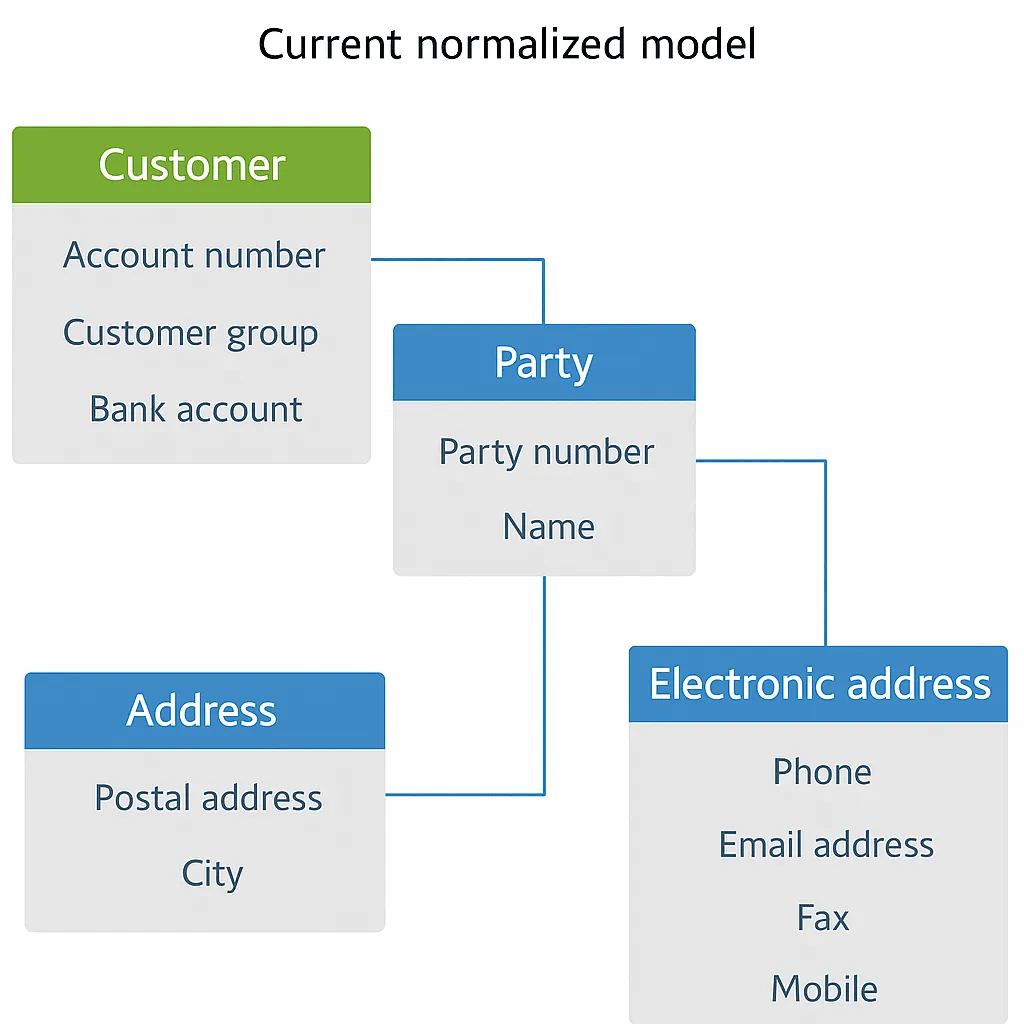
In simple terms, a data entity is an abstraction on top of one or more database tables in F&O. Instead of dealing with dozens of related tables, you get one simplified, denormalized view that represents a business concept. The standard example is the customer. In the database the data of one customer is spread over several tables, shown here as four.
A customer entity returns that data as one flat record, so you read or write a customer in one go without joining those tables in code or in an integration.
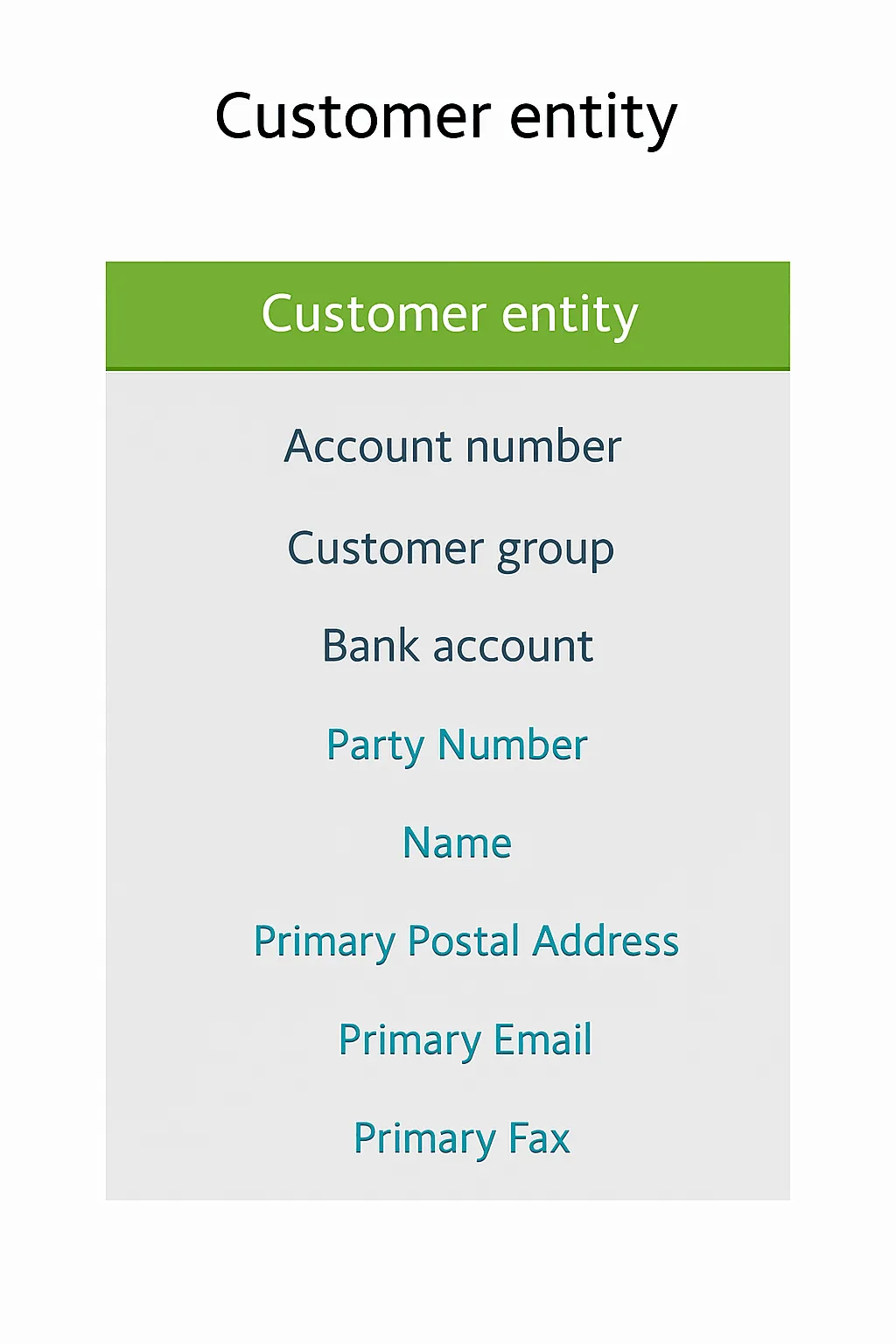
The example is redrawn from Microsoft Learn. A real entity of this kind is Customers V3, CustCustomerV3Entity in the Application Explorer. It returns fields from CustTable, from the party record in DirPartyTable and from the postal and electronic address tables. OData serves it at /data/CustomersV3 under the URL of your environment.
This abstraction is not only a convenience. It also insulates your code and integrations from changes in the physical tables. If Microsoft changes the underlying tables in a new version, the integrations and customizations that use the entity can stay the same. In that sense a data entity is a stable contract for the data.
Data entities carry business logic too. Validation and the insert and update code on the underlying tables also run when data comes in through the entity, unless an import is set up to skip them (see Extensibility). The entity can add X++ logic of its own. Logic that sits on a form does not run, because the entity never opens the form.
Why do data entities matter?
Data entities might sound technical, but import, export and most integrations in F&O run through them. They were introduced to unify and simplify how the system handles data. Whether you import, export or integrate through an API, you work with the data in one consistent way.
- One mechanism for import and export. Data entities are the primary mechanism for importing and exporting data packages, for example configuration and demo data during an implementation.
- Ready for integration. Data entities can be exposed as OData services, which makes it straightforward to integrate F&O with other systems and with Office tools like Excel. Instead of writing custom code that pulls data from dozens of tables, an integrator calls one entity.
- A bridge between functional and technical people. Because entities represent business concepts, a functional consultant who sets up an import project can select Customers V3 without knowing every table behind a customer record. The developer knows which tables and logic that name stands for and can extend the entity when needed.
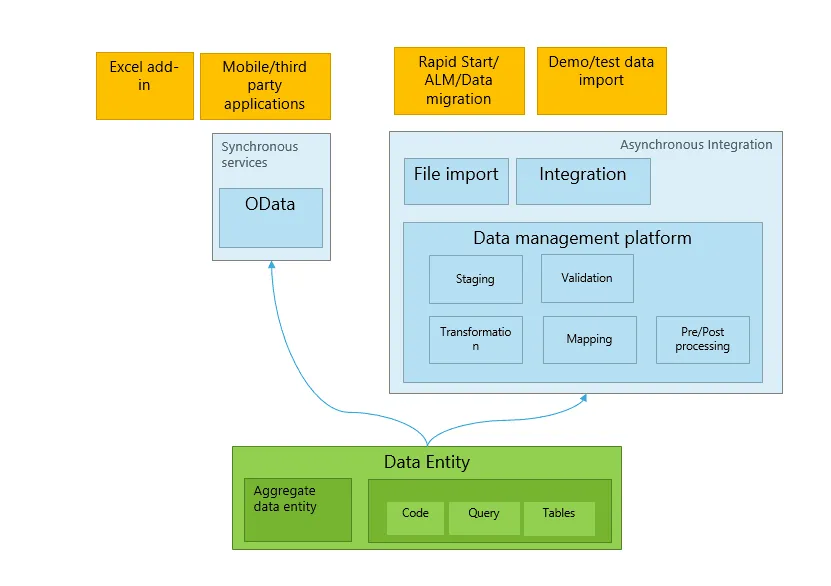
The diagram is from Microsoft Learn. One data entity serves OData for synchronous calls and the data management platform for asynchronous import and export.
Import and export with Data management
One of the most common uses of data entities is data import and export. If you have used the Data management workspace in F&O, you have seen data entities in action. Behind it is the data management framework (DMF), sometimes still called DIXF from the AX 2012 days. It uses entities for bulk data transfers such as migrating data from legacy systems, loading configuration or extracting data to files.
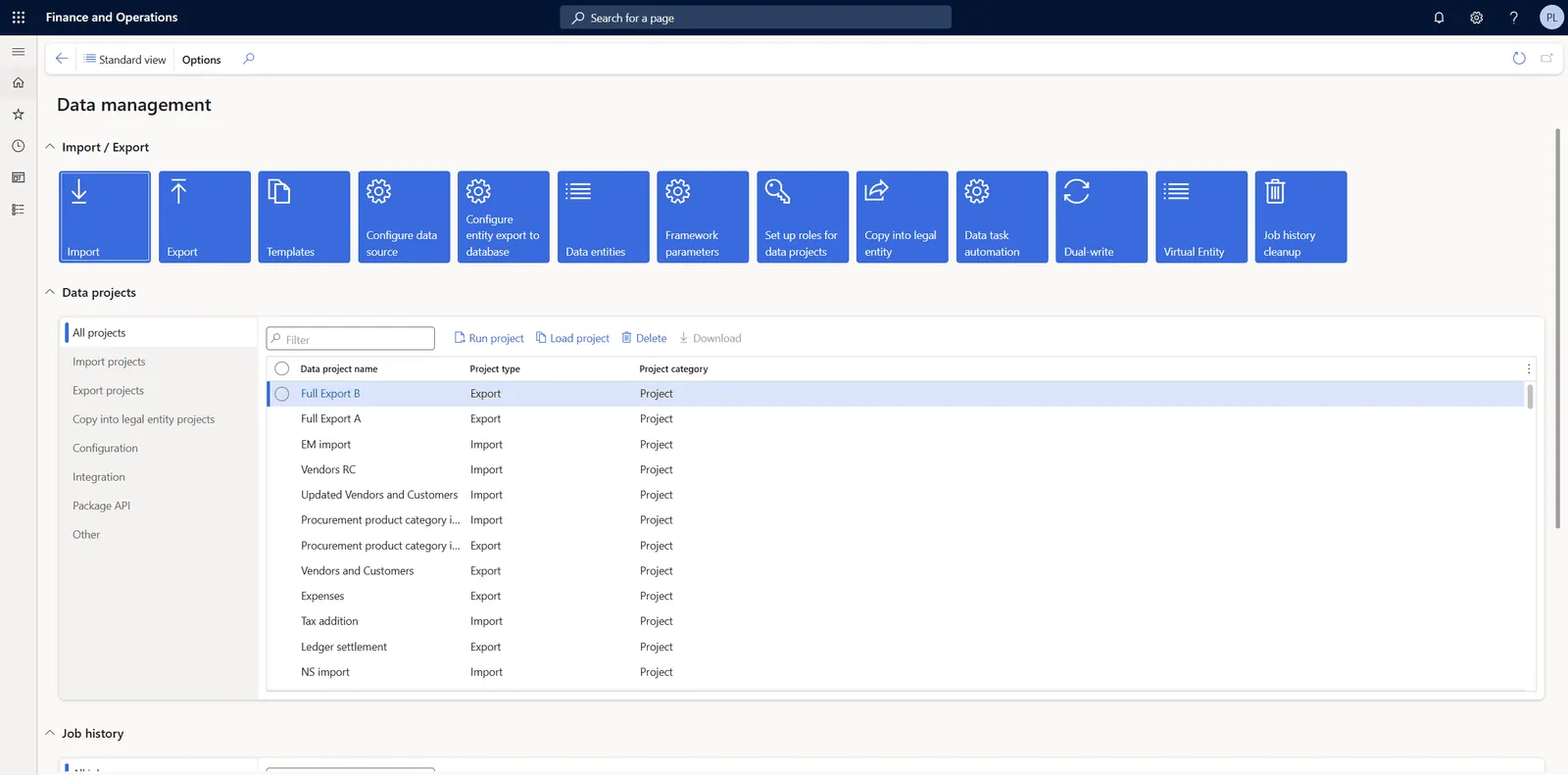
This is what happens when you run an import or export with a data project:
- Staging and target. An import loads the data into the staging table of the entity first and then moves it to the target tables. The staging table holds the fields of the entity and works as a buffer where validation and transformation take place. When something fails, you can review or clean up the staging data without corrupting real records. An export usually skips this step. In the Add entity dialog of an export project Skip staging is set to Yes by default and Microsoft’s advice is to leave it that way unless the entity needs staging, for example because it has virtual fields.
- Data projects. In the Data management workspace you create a data project and add one or more entities to it, for example Customers V3 for customers and Vendors V2 for vendors. For an import the source is a data package or a file in a format such as Excel or CSV. Because one entity can combine many tables, you fill in one file per entity instead of one file per table.
- Import and export execution. During an import DMF processes the entities one after another, or in parallel if you configure it that way. It parses the source file, fills the staging table, runs validation and business logic and then writes the data to the F&O tables. An export runs the other way. DMF reads the data through the entity and writes it to an Excel, CSV or XML file or, in a bring your own database (BYOD) scenario, directly to a SQL database.
- Monitoring and errors. Validation errors and skipped records are logged at the staging level. You can read the errors in the execution log, fix the data in the staging table and copy only the failed records to the target again. If 2 out of 1,000 records have a problem, you correct those 2 in staging and push them, without processing all 1,000 again.
Data entities power both one-time imports and exports and recurring file integrations through DMF. Whether you upload a CSV by hand or automate a nightly data feed, the data goes through the same entity.
Integration scenarios
Beyond file-based import and export, data entities are the foundation of several integration approaches in F&O. These are the four main ones.
OData
F&O exposes a RESTful OData endpoint that lets external applications create, read, update and delete data in real time through data entities. Each public entity acts as a small web service. Typical uses are a web store that creates sales orders and a mobile app that checks inventory levels. The entities are called with standard HTTP methods, so third-party systems integrate with them easily. F&O applies its security to every call and its validation to every write. OData is the right choice for real-time integrations with modest data volumes.
Bring your own database (BYOD)
BYOD exports data entities into an Azure SQL database that your organization owns. The usual reason is a data warehouse or a reporting tool that needs SQL access to the data. The export is scheduled as a batch job, either as a full push or as an incremental push based on change tracking. The data in the database is only as fresh as the last run. The jobs take resources in F&O while they run. Microsoft’s BYOD guidance for Human Resources is to run them at night or after hours and that is a sound rule for any large export.
BYOD still works, but Microsoft now counts it among its legacy data integration services. It recommends moving to Link to Microsoft Fabric, or to Azure Synapse Link for Dataverse when the data has to land in your own storage account. Both replicate F&O tables continuously, with no export jobs to schedule. A data entity can be exported that way too, but only when it is enabled as a virtual entity and supports row version change tracking, which not every entity does. For new reporting and analytics start with one of those two and keep BYOD for what already runs on it. I describe the options in F&O integration patterns.
Dual-write
Dual-write provides near real-time, bidirectional synchronization between F&O and Dataverse, the platform under the Dynamics 365 customer engagement apps such as Sales and Customer Service. It works through F&O data entities. A change in one system is written to the mapped table in the other, so both sides stay aligned. In live sync a change from Dataverse is written through the entity with an OData call, so the validation and business rules of F&O apply to it. Dual-write is a good fit when ERP and CRM work on the same records, such as customers, vendors, products and the quotes and orders shared with Dynamics 365 Sales. It is not meant for high-volume bulk transfers. The setup is covered in part 4 of this series.
Virtual entities
Virtual entities let Dataverse apps work with F&O data directly, without copying it into Dataverse. The data stays in F&O and shows up in Dataverse as a table that holds no data of its own, so there is no synchronization delay and no second copy to pay storage for. Create, read, update and delete are all supported. Use them for Power Apps, Power Pages sites and Power Automate flows that need current ERP data. The setup is covered in part 5. If you have to choose between the two, read Dual-write vs. virtual entities first.
Types of data entities
Microsoft sorts data entities into five categories, based on the kind of data they hold.
Parameter entities
Parameter entities contain the setup that controls how a module or a feature behaves. Typically such an entity holds one record of settings, in most modules one for each legal entity. Examples are the General ledger and Accounts payable parameters, where you define default accounts, posting behavior and number sequences. Parameter data is usually set during the initial implementation or when a module is configured and is rarely changed afterward.
Reference entities
Reference entities provide the lookup data that business processes need. They are small, mostly static sets of standardized values or codes that transactions and master data refer to. Examples are currencies, units of measure and payment terms. They are set up early in an implementation because transactional records rely on them.
Master entities
Master entities represent the main business records, such as customers, vendors, products and employees. These are the parties and items your organization works with every day. A master record usually carries a lot of linked detail such as addresses, contacts and credit information. Transactions build on this data. Because of their volume and complexity, master entities need careful maintenance and are commonly synchronized with other systems.
Document entities
Document entities represent business documents that are still being processed and have not been finalized or posted yet. They usually have a header with several lines, as in a sales order or a purchase order. Other examples are journal entries, invoices that are waiting to be posted and open inventory balances. Once processing is complete, the documents become posted transactions and stay in the system as permanent records.
Transaction entities
Transaction entities store completed, historical records of business activity, typically posted transactions such as posted invoices, ledger entries, payments and inventory movements. This data grows over time and is the financial and operational history of the organization. Historical reporting, auditing and compliance rely on it. Because of its volume and sensitivity it is handled carefully in data migrations and system copies and is often summarized instead of transferred in full.
Performance, extensibility and security
Keep these three things in mind when you work with data entities in F&O.
Performance
Data entities simplify data access, but you still need the right tool for the job. Real-time OData calls are convenient, but they become slow when they pull large datasets. F&O also throttles requests with a 429 response when its web servers are under heavy load. Do not let a client app page through hundreds of thousands of records over OData. Export the data in bulk through Data management or let the app query a copy of it in Fabric or in your data lake. In the same way, if you need to import millions of rows, break them into batches and use a Data management import instead of pushing them through the live API.
Use change tracking on entities for incremental loads. F&O then tracks changes on the underlying tables and an export pulls only the changed records instead of a full dump. In Data management a deleted record is passed on only by a BYOD export and only when it is deleted from the main table of the entity. An incremental export to a file never contains deletions.
Watch how many entities you pack into one data project or export job. Microsoft’s advice for BYOD export projects is to avoid hundreds of entities in one job, because it makes the job slower and less reliable. Group the data logically and run several jobs instead.
Extensibility
Data entities are part of the F&O platform and are meant to be extended. The most common change is a new field on an entity, for example to expose a custom field that you added to one of its tables. You can also add a new data source that brings in a related table. Both are done with an extension in Visual Studio. A new field also has to be added to the staging table of the entity with a table extension, otherwise Data management cannot import or export it. For your own tables you can create new data entities, so they take part in import, export and integration too. After you deploy a new entity, refresh the entity list under Data management > Framework parameters > Entity settings > Refresh entity list.
When you create or change an entity, define a proper key and proper relations so that the entity does not create duplicates. Change tracking works only for an entity with a unique key, so for incremental export you sometimes have to add a field or a combination of fields that makes every record unique.
On the entity itself you can override methods such as insert and update, for example to start a process after a record is imported. Use these hooks to enforce data quality, but keep heavy logic out of them because it slows down imports.
Validation that you add on the entity runs on every write that comes in through OData. In Data management it depends on how the entity is set up. On the Entity structure page of the entity the options Run business validations and Run business logic in insert or update method decide whether validateWrite, insert and update on the tables are called. Microsoft’s migration guidance says that a mature migration can switch this validation off to save time, so check these settings before you rely on a validation during an import.
Entities and fields that you add through extensions are supported and carry forward in updates. Still test after every update in case the underlying tables have changed.
Security
Data entities use the same roles, duties and privileges as the rest of F&O, but an entity is an entry point of its own, the way a menu item is. A user reaches an entity only through a privilege that grants it and that privilege says whether the access is for OData, for Data management or for both. This access does not follow from what the user can open in the client. A user with the export privilege on an entity can read data through it that they never see on a form. Most standard entities already have privileges. For your own entities you create them.
Microsoft also states that data entities do not support extensible data security (XDS), so do not count on an XDS policy to filter the rows that leave through an entity.
For a sensitive entity, say one that exposes payroll data, it is not enough to set Is Public to No. That property only keeps the entity off the OData endpoint. In Data management the entity can still be exported by every user who holds its export privilege. Access to a data project also includes its staging data. Give the import and export privileges only to the roles that need them, restrict each data project with Applicable roles and review which service accounts can call which entities.
Final thoughts
A standard environment has several thousand data entities. My development environment on version 10.0.48 has 5,805 of them and 4,500 of those are exposed through OData. So before you build an integration or a custom entity, open the Data entities list in the Data management workspace. Most of the time the entity you need already exists.
The practical side is in part 2. It covers import and export in Data management, extending a standard entity with a new field and building a custom entity. Parts 3 to 5 move on to Dataverse, starting with the comparison of Dual-write and virtual entities.
Have you worked with data entities in your projects? Let me know on LinkedIn or through the contact page.
Links
- https://learn.microsoft.com/en-us/dynamics365/fin-ops-core/dev-itpro/data-entities/data-entities
- https://learn.microsoft.com/en-us/dynamics365/fin-ops-core/dev-itpro/data-entities/configuration-data-projects
- https://learn.microsoft.com/en-us/dynamics365/fin-ops-core/fin-ops/data-entities/data-import-export-job
- https://learn.microsoft.com/en-us/dynamics365/fin-ops-core/dev-itpro/data-entities/data-entities-data-packages
- https://learn.microsoft.com/en-us/dynamics365/fin-ops-core/dev-itpro/data-entities/data-export-perform
- https://learn.microsoft.com/en-us/dynamics365/fin-ops-core/dev-itpro/data-entities/integration-overview
- https://learn.microsoft.com/en-us/dynamics365/fin-ops-core/dev-itpro/data-entities/odata
- https://learn.microsoft.com/en-us/dynamics365/fin-ops-core/dev-itpro/analytics/export-entities-to-your-own-database
- https://learn.microsoft.com/en-us/dynamics365/human-resources/hr-admin-integration-byod-batch-jobs
- https://learn.microsoft.com/en-us/power-apps/maker/data-platform/azure-synapse-link-transition-from-fno
- https://learn.microsoft.com/en-us/power-apps/maker/data-platform/azure-synapse-link-select-fno-data
- https://learn.microsoft.com/en-us/dynamics365/fin-ops-core/dev-itpro/data-entities/dual-write/dual-write-overview
- https://learn.microsoft.com/en-us/dynamics365/fin-ops-core/dev-itpro/power-platform/virtual-entities-overview
- https://learn.microsoft.com/en-us/dynamics365/fin-ops-core/dev-itpro/power-platform/faq
- https://learn.microsoft.com/en-us/dynamics365/fin-ops-core/dev-itpro/data-entities/service-protection-api-limits
- https://learn.microsoft.com/en-us/dynamics365/fin-ops-core/dev-itpro/data-entities/entity-change-track
- https://learn.microsoft.com/en-us/dynamics365/fin-ops-core/dev-itpro/data-entities/validations-defaults-unmapped-fields
- https://learn.microsoft.com/en-us/dynamics365/fin-ops-core/dev-itpro/sysadmin/optimize-data-migration
- https://learn.microsoft.com/en-us/dynamics365/fin-ops-core/dev-itpro/data-entities/security-data-entities