Dual-write vs. virtual entities in Microsoft Dynamics 365 F&O. Which one should you use?
Dual-write or virtual entities for connecting D365 F&O with Dataverse? How each one works, what each one costs you and one question that decides between them.

Dual-write and virtual entities both connect Dynamics 365 Finance and Operations with Dataverse, but they do it in opposite ways. Dual-write copies the data and keeps the two copies in sync. Virtual entities leave the data in F&O and fetch it every time Dataverse asks for it. This post explains how each one works, what each one costs you and how to choose between them.
What is Dual-write?
Dual-write is a framework that enables near real-time, bidirectional synchronization between Dataverse and F&O. When data is updated in one system, the change is reflected in the other almost instantly.
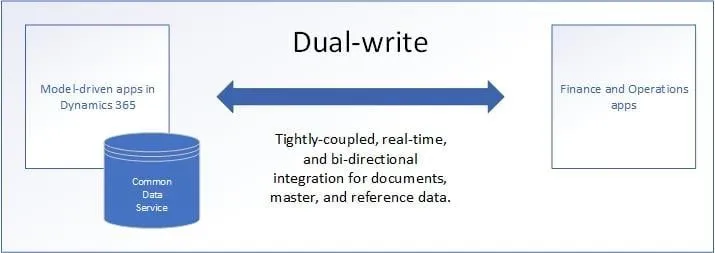
The diagram is from Microsoft Learn and still shows Common Data Service, the old name of Dataverse.
Key benefits of Dual-write
- Consistent data. A record holds the same values in both systems.
- Pre-built templates. Microsoft provides ready-to-use table maps for the common scenarios.
- Two-way data flow. A change made in either system reaches the other automatically.
- Data integrity. Validations apply in both systems.
When to use Dual-write
- You need synchronized master data across F&O and other Dynamics 365 apps.
- You want to use pre-built templates for easier setup.
- You require near real-time updates between systems to support business processes.
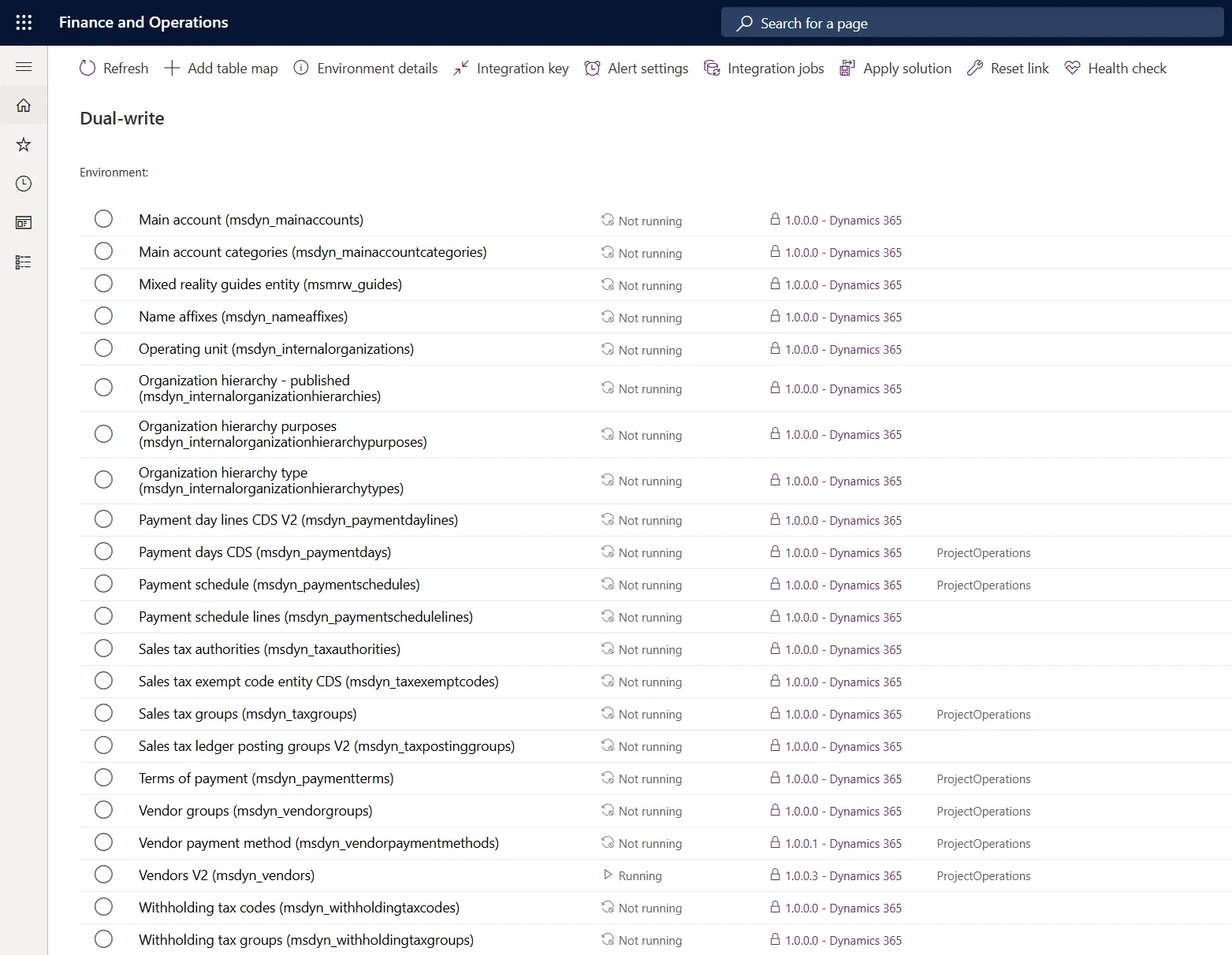
This is the Dual-write page in F&O. Every row is a table map, one pair of tables that Dual-write keeps in sync. You start or stop each map separately.
What Dual-write costs you
- The data is stored twice, so it uses Dataverse capacity.
- Live sync is synchronous. A save in one system is committed only when the other system accepts it, so a failing plug-in or a slow response in Dataverse blocks the save in F&O.
- A transaction from F&O can carry at most 1,000 records and every transaction has to finish within two minutes or it is rolled back on both sides. That makes Dual-write a poor fit for bulk imports and high-volume batch jobs, so keep the table maps stopped until data migration is finished.
- The F&O environment and the Dataverse environment have to be in the same Microsoft Entra tenant and the same Azure datacenter.
- Cloud-hosted environments are not supported, so test Dual-write on a sandbox or a unified developer environment.
From version 10.0.40 there is also Dual-write async, a mode for high-volume tables that can live with a short delay. As of October 2026 it is still in public preview and preview features are not meant for production.
What are virtual entities?
Virtual entities allow you to access F&O data in Dataverse without storing it there. Instead of synchronizing and duplicating records, virtual entities retrieve data directly from F&O in real time whenever it is needed. The access is not read-only. You can also create, update and delete F&O records from Dataverse. In Power Apps and in the Dataverse documentation the same feature is called virtual tables, because Dataverse renamed entities to tables in November 2020.
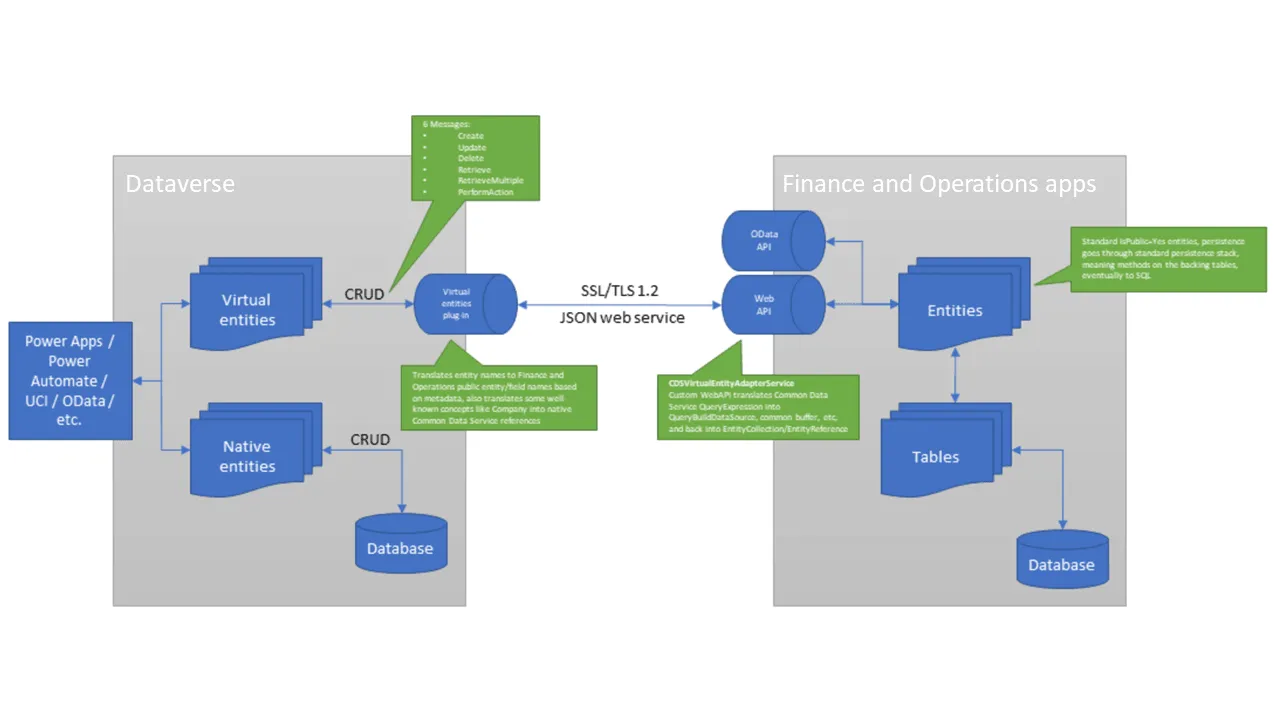
Read the diagram from left to right. An app asks Dataverse for a record and the virtual entity plug-in turns the request into a call to a web service in F&O. There it runs through the data entity and the answer travels back the same way. The diagram is from Microsoft Learn.
Key benefits of virtual entities
- No data duplication. Data is stored only in F&O, which saves storage costs.
- Real-time access. You always see the latest data with no syncing delay.
- No sync jobs. Nothing runs in the background.
- Easier maintenance. There are no table maps to manage and no replication errors to fix.
When to use virtual entities
- You need real-time access to F&O data without duplication.
- You want to avoid the extra storage costs of Dual-write.
- You want to read and edit F&O data from Power Apps, Power Pages or Power Automate.
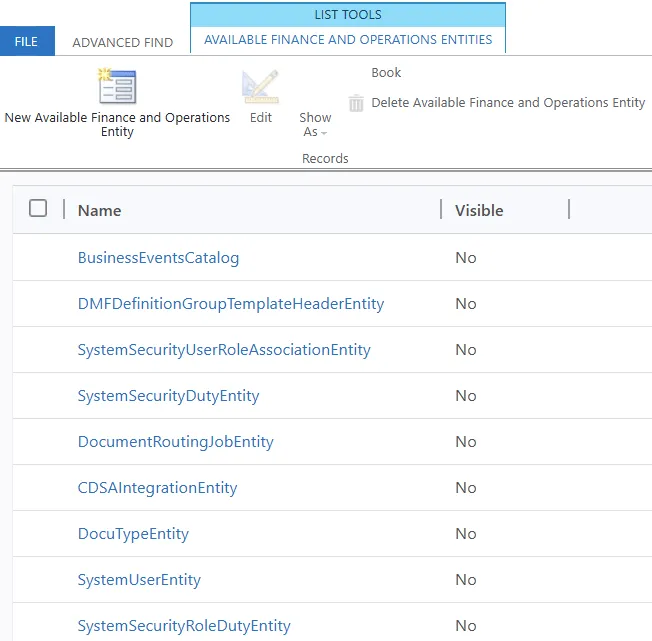
In Dataverse the public F&O data entities, the same ones OData exposes, are listed under Available Finance and Operations Entities. An entity becomes a virtual entity when you mark it as Visible, which is covered in part 5 of this series.
What virtual entities cost you
- Every read and write is a live call to F&O. A list built on a virtual entity is only as fast as F&O answers and it cannot load while F&O is unavailable.
- Every signed-in person who reads or changes the data must also exist as a user in F&O, because the call runs under that user and F&O security decides what they see. Anonymous visitors of a Power Pages site are the exception. Their calls run under one F&O user that you name in the system parameters.
- Virtual entities are not native tables. Auditing, business process flows, field-level security and Dataverse calculated or rollup columns are not supported. Attachments are read-only.
- Keep both environments in the same Azure region so the calls to F&O stay fast.
Virtual entities are not built for reporting. Every query goes to F&O, so reading large amounts of data this way is slow. Dataverse also does not support charts and dashboards on virtual entities. For reporting and analytics use Azure Synapse Link for Dataverse or Link to Microsoft Fabric. I describe both in F&O integration patterns.
Key differences between Dual-write and virtual entities
| Feature | Dual-write | Virtual entities |
|---|---|---|
| Data flow | Bidirectional | Nothing is synced. Dataverse reads and writes F&O data on request (full CRUD) |
| Storage | Data exists in both F&O and Dataverse | Data stays only in F&O |
| Best for | Master data sync, documents such as quotes and orders shared with Dynamics 365 Sales, integration with standard Dataverse tables | Real-time access to F&O data, no duplication and direct use in Power Platform |
| Setup complexity | Requires configuration and mapping | Little setup, each entity only has to be made visible |
| Users and security | The copy in Dataverse is protected by Dataverse security roles and owner teams. F&O security does not follow the data | Every signed-in user must also exist in F&O and sees only what their F&O security roles allow |
| Performance impact | Can slow down saves because each record is also written to the other system | No sync overhead but every request waits for F&O to respond |
Both options run on the Power Platform integration, which links one F&O environment to one Dataverse environment. Microsoft has required that link for every sandbox and production environment since 1 May 2025.
Using both together
In some cases a hybrid approach is the best choice:
- Use Dual-write for tables that both systems work on. Customers, products and sales orders shared with Dynamics 365 Sales are the usual examples. Each app has its own logic on those tables and needs a local copy.
- Use virtual entities for F&O data that Dataverse only needs to show or edit in place. On-hand inventory and retail transactions are typical examples. A second copy of that data adds nothing.
Which one should you use?
Ask one question. Does a Dataverse app need its own copy of the F&O data?
If it does, use Dual-write. That is the usual case when F&O runs next to Dynamics 365 Sales or another customer engagement app and both work on the same customers, products or orders.
If it does not, use virtual entities. An app, a portal or a flow that only has to show or change F&O data does not need a copy of it.
You can also run both, as described above.
The setup of each one is covered step by step in the next two posts of this series, part 4 on Dual-write and part 5 on virtual entities.
What is your experience with Dual-write and virtual entities? Let me know on LinkedIn or through the contact page.
Links
- https://learn.microsoft.com/en-us/dynamics365/fin-ops-core/dev-itpro/power-platform/overview
- https://learn.microsoft.com/en-us/dynamics365/fin-ops-core/dev-itpro/data-entities/dual-write/dual-write-overview
- https://learn.microsoft.com/en-us/dynamics365/fin-ops-core/dev-itpro/data-entities/dual-write/dual-write-system-req
- https://learn.microsoft.com/en-us/dynamics365/fin-ops-core/dev-itpro/data-entities/dual-write/sync-limits
- https://learn.microsoft.com/en-us/dynamics365/fin-ops-core/dev-itpro/data-entities/dual-write/dual-write-async
- https://learn.microsoft.com/en-us/dynamics365/fin-ops-core/dev-itpro/power-platform/virtual-entities-overview
- https://learn.microsoft.com/en-us/power-apps/developer/data-platform/virtual-entities/get-started-ve
- https://learn.microsoft.com/en-us/power-apps/maker/data-platform/azure-synapse-link-select-fno-data